


AI Overviews & AI Mode for Local Businesses: How to Get Recommended
-
Author
Anindita Barik
-
Updated Date
Nov-02-2026
-
Views
2 Min Read
-
Author: PromotEdge Digital
-
Updated Date: Nov-02-2026
-
Views: 2 Min Read
-
Author: Anindita Barik
Learn how local businesses can improve their visibility in Google AI Overviews and AI Mode with proven local SEO strategies. This guide explains how Google evaluates relevance, distance and prominence, along with seven practical ways to strengthen your online presence. From optimising your Google Business Profile and LocalBusiness schema to building genuine reviews, creating helpful content and tracking AI search performance, find actionable steps to improve local visibility, attract potential customers and earn trust in AI-powered search results.
AI Overviews for local businesses are changing how people discover and choose nearby services through Google Search. Instead of relying only on traditional search listings, users can now find AI-generated summaries, business suggestions and links to relevant websites.
For local businesses, this raises an important question: What does it take to appear in these AI-generated results?
It’s all about understanding how Google processes local information and how your website supports that process. You do not need a new type of schema or a separate set of SEO rules. You need to build on the fundamentals of local SEO while adapting your approach to Google’s AI-powered search features.
This guide explains how AI Overviews and AI Mode work and what local businesses can do to improve their visibility.
What Are Google AI Overviews and AI Mode?
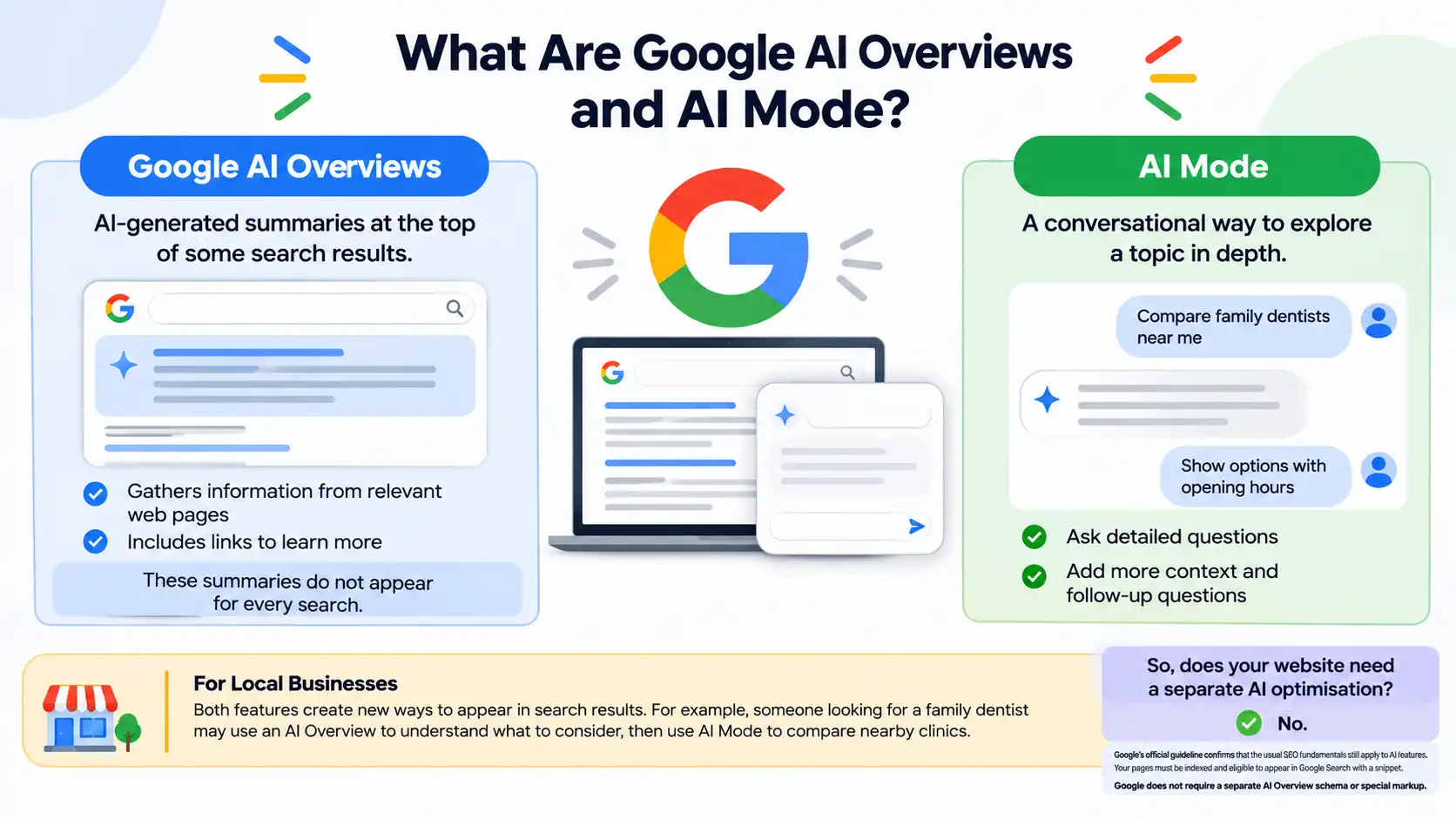
Google AI Overviews and AI Mode are two AI-powered features in Google Search, but they serve different purposes.
Google AI Overviews provide AI-generated summaries at the top of some search results. They gather information from relevant web pages and include links that users can visit to learn more. These summaries do not appear for every search.
AI Mode works more like a conversation. Users can ask detailed questions, add more context and ask follow-up questions to narrow down their search. It helps them explore a topic without starting a new search for every question.
For local businesses, both features create new ways to appear in search results. For example, someone looking for a family dentist may use an AI Overview to understand what to consider before choosing one. They may then use AI Mode to compare nearby clinics based on location, services, opening hours or cost.
So, does your website need a separate AI optimisation?
No. Google’s official guideline confirms that the usual SEO fundamentals still apply to AI features. Your pages must be indexed and eligible to appear in Google Search with a snippet. Google does not require a separate AI Overview schema or special markup.
How Does Google Choose Which Local Businesses to Show?
Google does not publish a fixed checklist that guarantees a business a place in an AI-generated answer. Its local search guidance identifies three main factors for local results: relevance, distance and prominence.
AI Overviews and AI Mode also use Google’s wider search systems to find useful information from different searches and web pages. This means your business information, website content and local presence can all help Google understand whether your business matches a user’s search.
Relevance: Does the Business Match the Search?
Relevance measures how closely a business profile and its website match what the person wants. A broad profile that says only “home services” gives less useful information than one that clearly lists plumbing repairs, bathroom fitting, leak detection and emergency call-outs.
Use the language customers understand. Name each service, explain what it includes and state which customer problems it solves. Keep the information consistent across your website and Business Profile.
Distance: Is the Business Near the Searcher?
Distance refers to the location of the business in relation to the person searching. A business cannot control where a customer stands, and adding more city names to a page will not change its real location.
If you serve customers across several areas, explain your service coverage honestly. Create location pages only when you can add useful details about the work you do in each area.
Prominence: Is the Business Known and Trusted?
Prominence reflects how well-known a business is. Google says it can consider information such as links from other websites and customer reviews. Local press coverage, trade association listings, relevant business directories and community references can help people and search systems verify that a business has a real presence.
Google explains how prominence impacts local search rankings in its guidelines on local ranking factors.
7 Ways to Improve Your Chances of Appearing in AI Overviews for Local Businesses
1. Make Your Google Business Profile Complete and Accurate
Your Google Business Profile is one of the first places customers check when they want to confirm a local business. It should give a clear and accurate picture of what you offer.
Check that the business name, primary category, additional categories, address, phone number, website, opening hours and service areas are correct. Add the services you provide and select relevant attributes where they apply. Upload real-time photos of your premises, team, products or completed work.
Do not add keywords to the business name unless they form part of the real-world business name. Do not select categories simply because they have high search volume. Choose the categories that describe the business.
For a step-by-step profile and local search review, see our Local SEO Checklist for Small Businesses.
2. Keep Your Business Details Consistent Across the Web
Your business may appear on Google, Apple Maps, Bing Places, Yelp, Facebook, local directories and industry websites. Check that these listings show the correct business name, address, phone number (NAP) and website.
Small formatting differences do not automatically cause a ranking penalty. However, outdated phone numbers, old addresses, duplicate listings and conflicting opening hours can confuse customers and make your business information confusing. Correct the source listings rather than creating more directory profiles.
Also, keep a simple record of the platforms where your business has a profile. Review it whenever you change your phone number, update your working hours or add a new branch.
3. Build Useful Service and Location Pages
A homepage cannot answer every question about every service and location. So, give each important service its own page, then create location pages when the business genuinely serves those areas and can provide useful local information.
Add genuine details such as process, materials, service limitations, expected timelines, warranties or price ranges when you can verify them.
A location page should not be restricted only to a city name that is inserted into a standard template. Include local project examples, service coverage, directions, branch details or information that helps customers in that area make a decision.
Our playbook on local SEO for small businesses covers the wider work behind local visibility, including profiles, website pages, listings and reviews.
4. Write Pages That Answer Real-Time Customer Queries
People use conversational searches when they need a recommendation. They may ask, “Who repairs commercial air conditioners near me?”, “Which dentist offers evening appointments?” or “How much does an emergency plumbing visit cost?” Your pages should answer the questions that matter to your customers.
Begin each important section with a short, direct answer to the main question. Follow it up with the explanation, evidence or steps that support the answer. Use descriptive headings, short paragraphs and lists where they make information easier to scan.
For example, a roofing company could explain which roof repairs it handles, the areas it covers, how it inspects a roof and what affects repair costs. A clinic could list its treatments, practitioner qualifications, appointment options and accepted payment methods.
Avoid writing several pages that repeat the same claims with different city names. Original details, first-hand experience, photographs and client testimonials give a page more value than a generic block of SEO text.
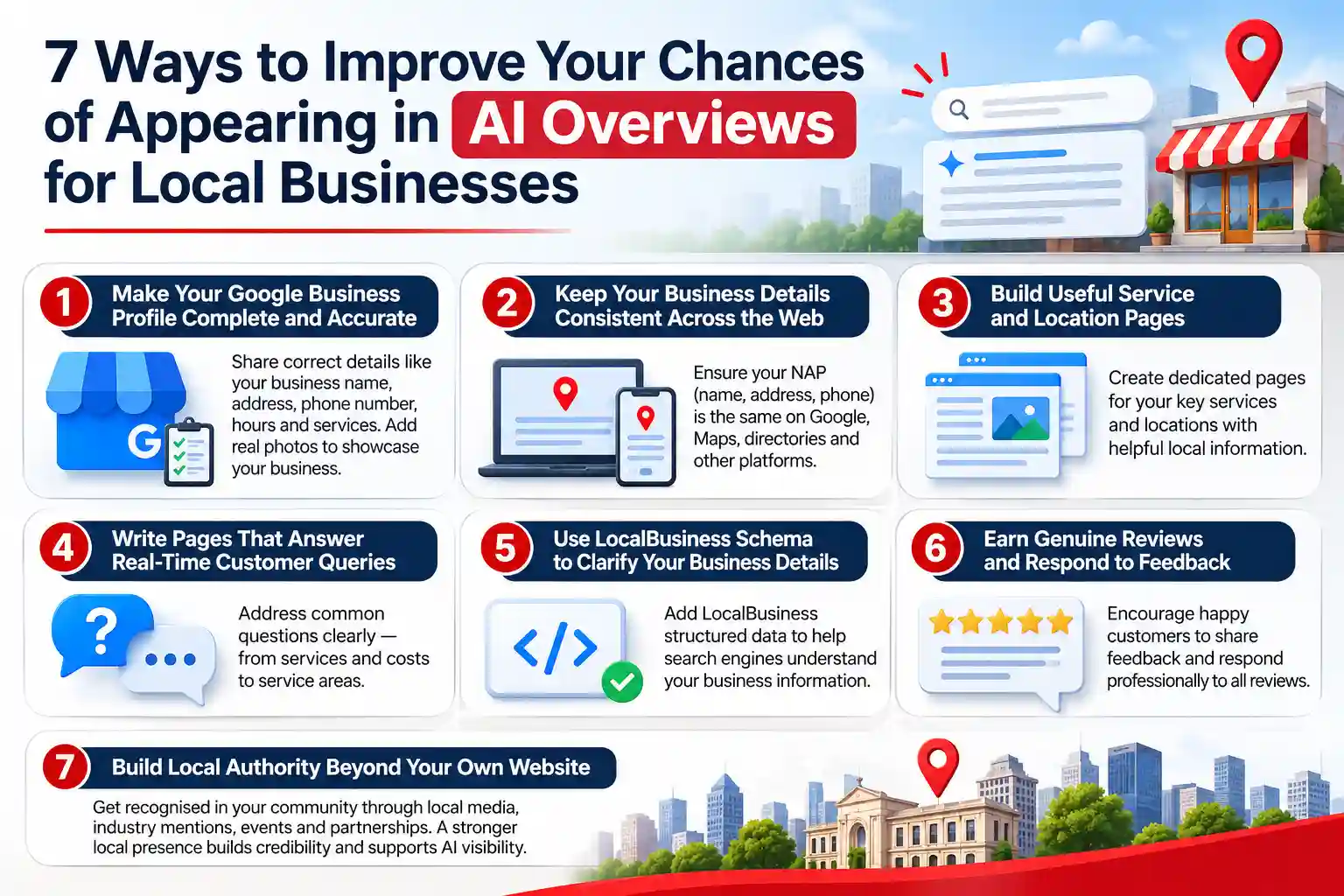
5. Use LocalBusiness Schema to Clarify Your Business Details
LocalBusiness schema helps search engines understand important details about your business, such as its name, address, phone number, opening hours and other relevant information. It uses structured data to describe the information available on your website in a format search engines can interpret.
Choose the most specific LocalBusiness subtype that matches your business. Add properties that reflect the information visible on your website and always keep them updated. If your business has multiple branches, provide accurate details for each location.
Remember, schema helps search engines interpret your business information, but it does not guarantee a rich result, an AI Overview citation or a higher local ranking. Google also requires structured data to match the content visitors can see on the page.
To understand how to implement this correctly, follow Google’s official LocalBusiness structured data guidelines.
6. Earn Genuine Reviews and Respond to Customer Feedback
Customer reviews help potential buyers understand the quality of your services and what they can expect from your business. They also provide useful information about your staff, location and customer experience.
Ask customers to share honest feedback after a purchase or completed service. Avoid offering rewards for positive reviews, writing reviews on their behalf or asking them to use specific keywords. Let customers describe their experiences in their own words.
Make it a habit to respond to customer feedback. Thank customers for positive reviews and address complaints professionally. If someone reports a service issue, invite them to contact your business so you can discuss the matter further. Never share private customer information in public replies.
A high star rating is not the only factor that guarantees an AI recommendation. Focus on providing good service, genuine customer feedback and helpful responses that make your business trustworthy.
7. Build Local Authority Beyond Your Own Website
Your website is not the only place where people can learn about your business. Mentions from local newspapers, chambers of commerce, trade associations, suppliers, community organisations and industry publications can help establish your business’s credibility and local presence.
Look for genuine ways to get your business recognised. Share expert opinions with local publications, participate in community events, publish project case studies and maintain accurate profiles on relevant industry platforms. Emphasize on building a credible public presence rather than collecting random backlinks or paid mentions.
These activities also support your wider local SEO strategy. Our Local SEO services cover important areas such as local listings, customer reviews, location pages and authority building to help businesses improve their local search visibility.
Do You Need to Allow AI Search Crawlers?
If you want your public pages to appear in ChatGPT Search, check that your site does not block OAI-SearchBot in robots.txt or through a firewall. OpenAI explains that OAI-SearchBot is used to discover websites for ChatGPT search results. GPTBot is a separate crawler setting associated with model training, so the two permissions should not be treated as the same control.
This is separate from Google AI Overviews and AI Mode, which use Google Search systems. Allowing an OpenAI crawler does not make a page eligible for Google’s AI features. For Google, focus on crawl access for Googlebot, indexability, useful content and the usual Search requirements.
You can learn more about crawler access and permissions in OpenAI’s official crawler documentation.
How to Measure Visibility in AI Search
To measure your visibility in AI search, track how often your business appears in AI-generated answers, which website pages receive visits and whether those visits lead to enquiries or sales.
Do not rely on a single AI answer to judge your progress. Results can vary based on the search query, user’s location, search time and information available to the platform.
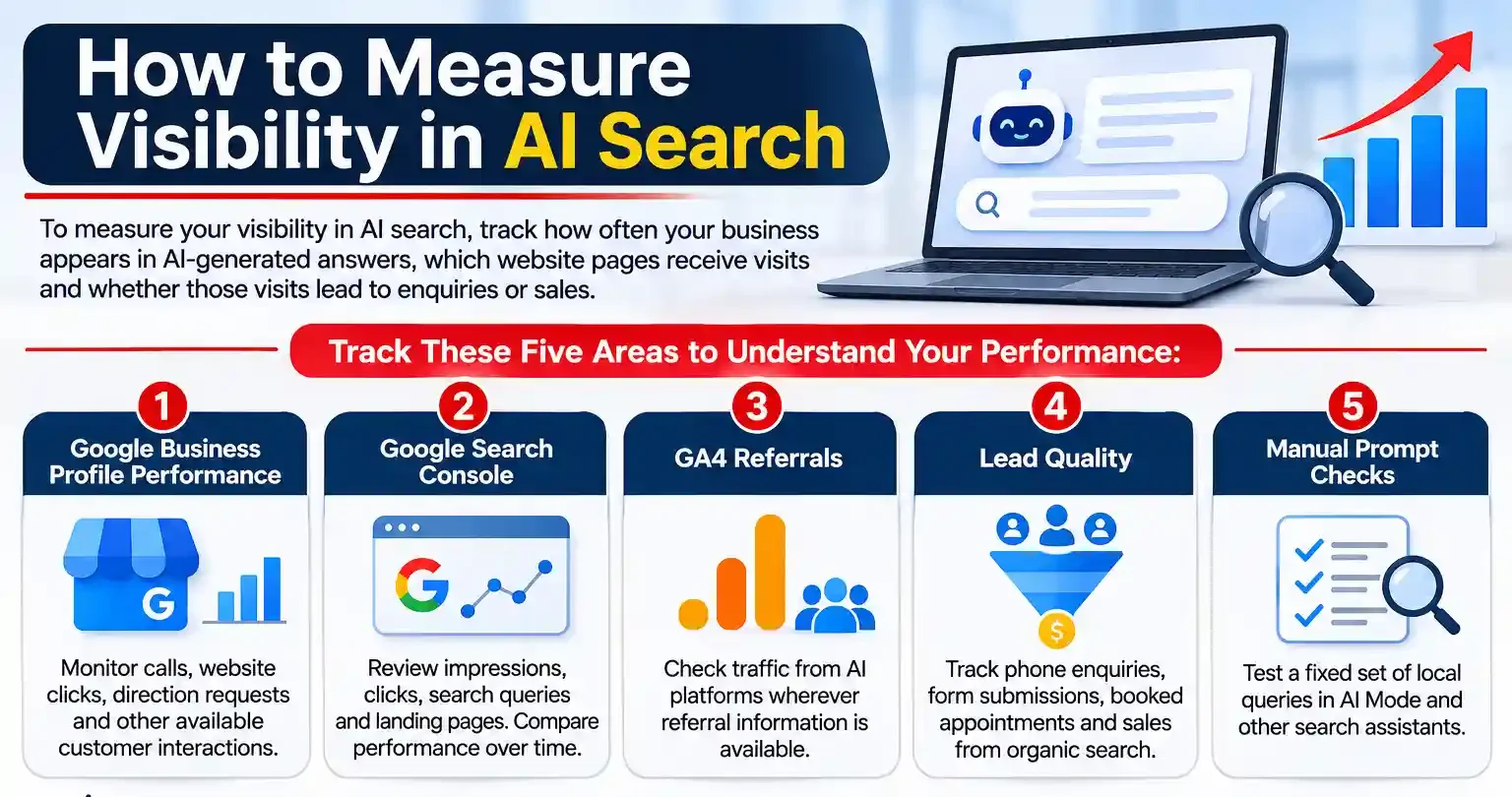
Track these five areas to understand your performance:
- Google Business Profile performance: Monitor calls, website clicks, direction requests and other available customer interactions.
- Google Search Console: Review impressions, clicks, search queries and landing pages. Compare performance over time instead of treating a single change in click-through rate as proof of an AI citation.
- GA4 referrals: Check traffic from AI platforms wherever referral information is available. Some visits may appear under referral, direct or other traffic channels.
- Lead quality: Track phone enquiries, form submissions, booked appointments and sales from organic and local search channels.
- Manual prompt checks: Test a fixed set of non-branded local queries in AI Mode and other relevant search assistants. Record whether your business appears, which website pages or sources are cited and whether the business information is accurate.
Keep your list of test queries the same every month so you can compare the results. For example, a dental clinic could test “Which clinics in [area] offer emergency dental appointments?” and “What should I check before choosing a dentist in [area]?”
Run these checks from a consistent location and record the findings each month. Remember that manual AI search checks provide a useful indication of visibility, not a formal ranking report.
A Practical 30-Day Plan for Local Businesses
You do not need to change every part of your website at once. Use the first month to fix the information that customers and search engines rely on most.
- Days 1–7: Review your Google Business Profile, website indexation, robots.txt file, access to important pages, contact details and duplicate business listings.
- Days 8–15: Correct your business information across important directories. Update your Business Profile categories, services, opening hours, photos and service areas.
- Days 16–23: Improve the most important service pages and location pages. Add clear answers, real examples, useful images and accurate LocalBusiness structured data where relevant.
- Days 24–30: Set up review-response routines, record baseline local performance, check AI referrals and run the first set of unbranded local prompt tests.
At the end of the month, prioritise the gaps that affect customers first: such as incorrect business details, missing services, weak website pages, poor mobile experience or unanswered reviews. Use these findings to plan your next month’s improvements.
To Sum it Up
There is no guaranteed way to get your business featured in Google AI Overviews or AI Mode. The best approach is to follow sound local SEO practices. Keep your website accessible, publish useful content, maintain accurate business information and build genuine customer trust.
When working on AI Overviews for local businesses, focus on helping Google understand what your business offers, where it operates and what makes it relevant to potential customers. Avoid shortcuts such as keyword stuffing, fixed review targets or unnecessary schema changes.
Remember, AI visibility is an extension of local SEO, not a replacement for it. Keep improving your online presence, monitor genuine customer enquiries and give potential customers clear reasons to choose your business.
Frequently Asked Questions
-
Can a small local business appear in Google AI Overviews?
Ans.Yes. A small business can be included when its pages are relevant, indexed and eligible to appear in Google Search. There is no special AI Overview submission process, and inclusion is never guaranteed. -
Does Google Business Profile affect AI Overviews?
Ans.A complete and accurate Business Profile supports local discovery and helps customers confirm business details. Google has not published a separate AI Overview ranking formula based on Business Profile fields, so businesses should treat profile optimisation as part of sound local SEO. -
Does LocalBusiness schema help a business appear in AI Mode?
Ans.LocalBusiness schema helps search engines interpret details about a business. It should match the visible page content and use accurate information. It does not guarantee inclusion in AI Mode or a higher ranking. -
Should a business create a separate page for every neighbourhood?
Ans.Only when it has a real service presence and useful information for that area. Pages that repeat the same text with only the neighbourhood name changed add little value and can create thin or duplicate content. -
How often should a business check its AI search visibility?
Ans.A monthly review can be a good starting point for most local businesses. Use the same set of unbranded prompts, note the results and compare them with local search performance, website visits and enquiries.
Author Details

Latest Posts
-
30 / Oct
-
 24 / Oct
-
 22 / Sep
Digital Marketing Digital Marketing for Ecommerce Brands: The 2027 Growth Playbook
-
 15 / Sep
-
 04 / Sep


-
Can a small local business appear in Google AI Overviews?
Ans.Yes. A small business can be included when its pages are relevant, indexed and eligible to appear in Google Search. There is no special AI Overview submission process, and inclusion is never guaranteed. -
Does Google Business Profile affect AI Overviews?
Ans.A complete and accurate Business Profile supports local discovery and helps customers confirm business details. Google has not published a separate AI Overview ranking formula based on Business Profile fields, so businesses should treat profile optimisation as part of sound local SEO. -
Does LocalBusiness schema help a business appear in AI Mode?
Ans.LocalBusiness schema helps search engines interpret details about a business. It should match the visible page content and use accurate information. It does not guarantee inclusion in AI Mode or a higher ranking. -
Should a business create a separate page for every neighbourhood?
Ans.Only when it has a real service presence and useful information for that area. Pages that repeat the same text with only the neighbourhood name changed add little value and can create thin or duplicate content. -
How often should a business check its AI search visibility?
Ans.A monthly review can be a good starting point for most local businesses. Use the same set of unbranded prompts, note the results and compare them with local search performance, website visits and enquiries.