


How to Do Keyword Research for a Small Business Website

-
Updated Date
Jul-16-2026
-
Views
2 Min Read
-
Author: PromotEdge Digital
-
Updated Date: Jul-16-2026
-
Views: 2 Min Read
-
Author: Milan Shyamal
If you run a small business, you’ve probably heard people say you need SEO. It gets mentioned a lot, but rarely in a way that’s actually useful. Most of the time, it’s just noise — no clear steps, no straight answer on how it’s supposed to bring in more customers.
Most guides will tell you to chase keywords with big search numbers. It sounds logical — more searches should mean more traffic, right? But for a small business, that approach usually doesn’t hold up. When your budget is limited and your site is still building trust, going after those broad, competitive terms often leads to a lot of effort with very little to show for it.
This guide is different.
We’re going to show you exactly how to do keyword research for a small business — the right way. That means targeting keywords based on relevance, search intent, and realistic competition. Not just raw numbers.
Finish this guide and you won’t be guessing anymore. You’ll have a simple way to pick keywords that bring in the kind of people who actually reach out, not just browse.
Let’s start.
What Is Keyword Research for a Small Business?
Keyword research is simply about understanding the exact words people use when they search for something you offer. Not what you think they should type — what they actually type.
Those phrases shape everything you do next. They point you toward the right topics, the right pages, and where your time will actually pay off. They tell you what pages to create, what to write about, and where you should be putting your effort so you’re not just guessing.
Why keyword research matters for small business SEO
Without keyword research, you’re essentially guessing. You might write blog posts nobody searches for, or build service pages that never rank because the competition is too tough.
With the right keywords, you can:
- Attract people who are already looking for what you sell
- Rank faster on Google because you’re targeting realistic opportunities
- Get more qualified leads — not just random visitors
- Build a content strategy that compounds over time
Before You Start: Define Your Business Goals, Services, and Audience
Don’t open any tools yet. Take a few minutes and put it on paper—what you actually sell, who you want to reach, and what you want your website to do for you. Be clear about it now, otherwise you’ll keep going back and changing things later.
Identify your core services or products
Write down every service or product you offer. Be specific. “Plumbing” is too vague. “Water heater installation,” “drain cleaning,” and “pipe repair” are the actual services people search for.
Define your ideal customer
Be specific about who you want to attract. Who usually needs what you offer, and what’s pushing them to start searching in the first place? A wedding photographer’s ideal customer is very different from a B2B software company’s.
Note your locations or service areas
If you mainly work in a certain city or a handful of nearby areas, write those down first. That’s usually where your early calls and enquiries come from.
Choose your primary conversion goal
What do you want visitors to do? Call you? Fill out a form? Buy a product? Your conversion goal shapes which keywords matter most.
Step 1: Build a Seed Keyword List
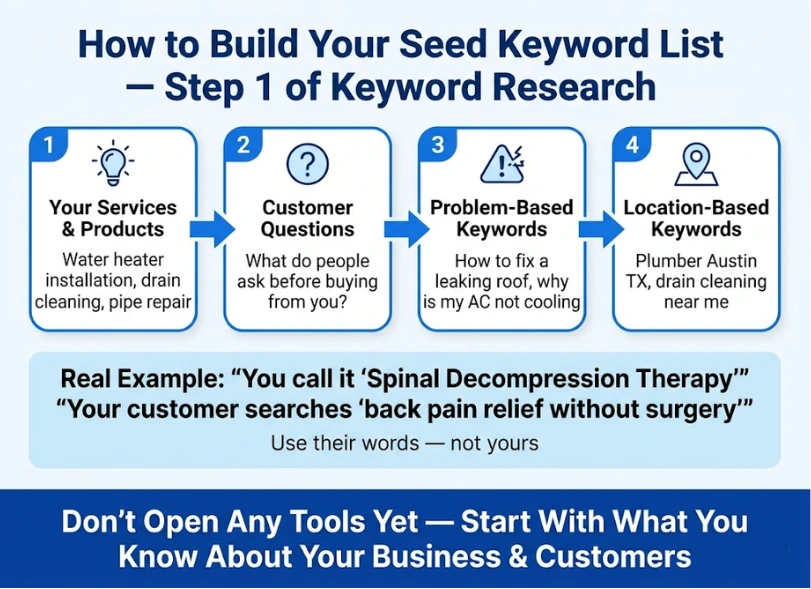
A seed keyword list is your starting point — a raw list of terms that describe what you do, who you serve, and where you do it. Don’t worry about search volume yet. Just brainstorm.
Start with your products, services, and common customer questions
Begin with the basics—what you offer and the questions people usually ask before they decide to reach out. Pay attention to how they say it, not how you’d phrase it internally. The words you use inside your business and the words your customers use are often not the same.
For example, a chiropractor might call it “spinal decompression therapy.” Their customer might search for “back pain relief without surgery.”
Add problem-based keywords
What problems do you solve? Write those down as keywords.
- “how to fix a leaking roof”
- “why is my website not showing on Google”
- “what to do when your furnace stops working”
Add location-based keywords for local SEO
Attach your city, neighborhood, county, and nearby areas to your core services. Local keyword research for small business is one of the fastest ways to rank — and it’s often where the biggest competitors aren’t paying attention.
Add brand, service, and solution modifiers
Add modifiers like “best,” “affordable,” “near me,” “for small business,” “same-day,” and “professional” to expand your list further.
Step 2: Expand Your Keyword List Using Free and Paid Tools
Once you have your seed list, it’s time to grow it. Here are the best places to look.
Related Searches
At the bottom of every Google results page, there’s a “Related Searches” section. These give you lateral keyword ideas you might not have thought of.
Google Keyword Planner
Free with a Google account. It shows you monthly search volume ranges and competition levels. It’s not the most accurate tool out there, but it gives you a rough idea of what people are searching for, which is enough to get started.
Tools like Ubersuggest, Ahrefs, Semrush, and AnswerThePublic go a step further. They show you how often a keyword is searched, how competitive it is, what your competitors are ranking for, and a lot of related keyword ideas you wouldn’t think of on your own.
If you’re serious about your small business SEO keyword research, investing in even a basic tier of one of these tools is worth it.
Step 3: Understand Search Intent Before Choosing Keywords
This is the step that most small business guides completely skip — and it’s the one that makes the biggest difference.
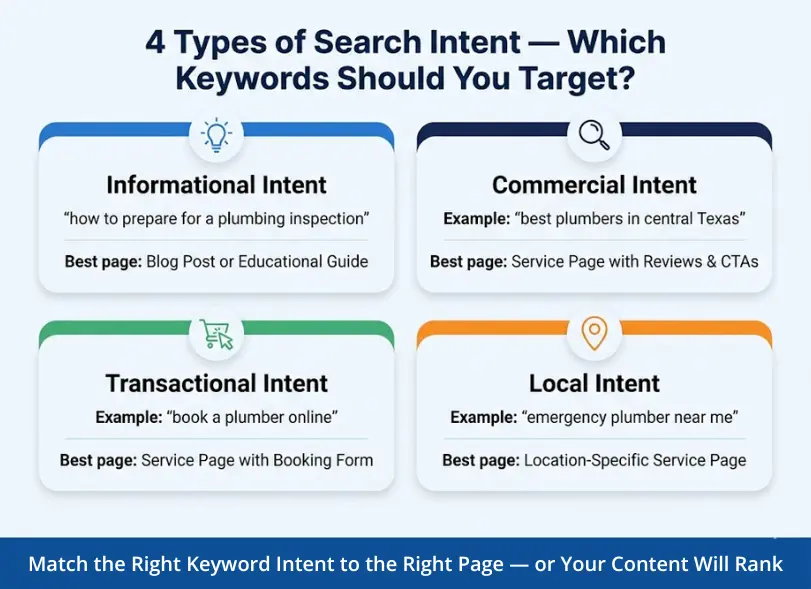
Search intent is the reason behind a search. Two keywords can look similar but have completely different intent — and completely different best page types.
Informational intent
The person wants to learn something. They’re not ready to buy yet.
Example: “how to prepare for a plumbing inspection”
Best page type: Blog post or educational guide
Commercial intent
The person is researching options. They’re getting closer to a decision.
Example: “best plumbers in central Texas”
Best page type: Service page with trust signals, reviews, and clear CTAs
Transactional intent
The person is ready to act right now.
Example: “book a plumber online” or “plumber prices near me”
Best page type: Service page or location page with click-to-call and booking form
Local intent
The person needs something nearby.
Example: “emergency plumber near me”
Best page type: Location-specific service page
How to match keyword intent with the right page type
| Keyword | Intent | Best Page Type |
|---|---|---|
| “common plumbing problems and solutions” | Informational | Blog post |
| “best plumbers in central Texas” | Commercial | Service page |
| “emergency plumber near me” | Local/Transactional | Location page |
| “how much does a plumber charge per hour” | Informational | Blog post or FAQ |
| “hire a plumber in Austin” | Transactional | Service or location page |
Step 4: Find Low-Competition, High-Intent Keywords
This is where small businesses win. You don’t need to chase the keywords with 100,000 monthly searches. You need the ones where you can actually rank — and that still bring in buyers.
Why long-tail keywords work better for small businesses
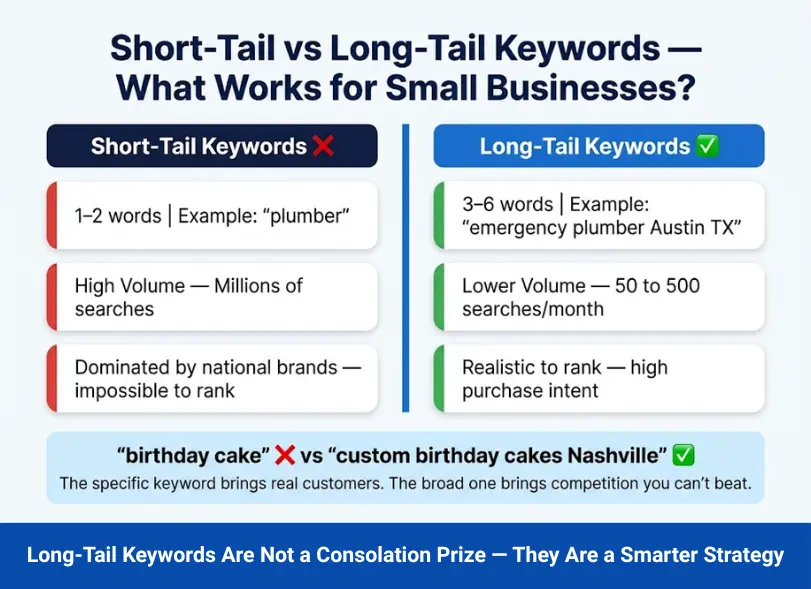
Long-tail keywords are longer, more specific phrases — usually three to six words. They get fewer searches per month, but the people searching them are far more specific about what they want.
A bakery in Nashville doesn’t need to rank for “birthday cake.” They need to rank for “custom birthday cakes Nashville” and “gluten-free wedding cake Nashville.” These are the keywords that bring in real customers.
Long-tail keywords for small business aren’t a consolation prize. They’re a smarter strategy.
How to spot realistic ranking opportunities
Look at the top results for any keyword you’re considering. Ask these questions:
- Are the top 5 results major national brands with huge authority?
- Or are some results from small, local businesses and mid-size websites?
- Are the existing pages thin, outdated, or poorly written?
If smaller sites are already ranking, that’s a signal that you can compete. If it’s Amazon, Wikipedia, and Forbes across the board — move on.
How to balance search volume, difficulty, and intent
The sweet spot for a small business is a keyword that has:
- Enough search volume to matter (even 50–500 searches/month can drive meaningful leads)
- A keyword difficulty score you can realistically compete with (under 30–40 on most tools)
- Clear commercial or local intent
Step 5: Analyze Competitors Ranking for Your Keywords
Before you finalize your keyword list, spend time studying who’s actually ranking for your target terms. This competitor keyword analysis for small business is one of the most valuable — and most skipped — steps.
Check the top 5 results manually
For each keyword you’re seriously considering, Google it yourself. Don’t just check search volume in a tool — actually look at who’s ranking.
Review page type, title tags, and content depth
Are the top results long, detailed guides? Short service pages? Local directories? This tells you what Google believes best answers that query — and what you’ll need to create to compete.
Spot content gaps you can cover better
Look at what the existing top-ranking pages are missing. Can you:
- Add more specific local details?
- Include a real example or case study?
- Answer questions that competitors skip?
- Update outdated information?
Identify weak competitors you can realistically outrank
When reviewing the top results, ask these specific questions about each competitor:
- Are they generic? (No specific local information, no personal brand)
- Are they outdated? (Written 4–5+ years ago, no recent updates)
- Are they tool-heavy but execution-light? (Full of screenshots but no real advice)
- Are they missing examples, FAQs, or local angles?
Every “yes” is an opportunity for you.
Step 6: Group Keywords into Clusters
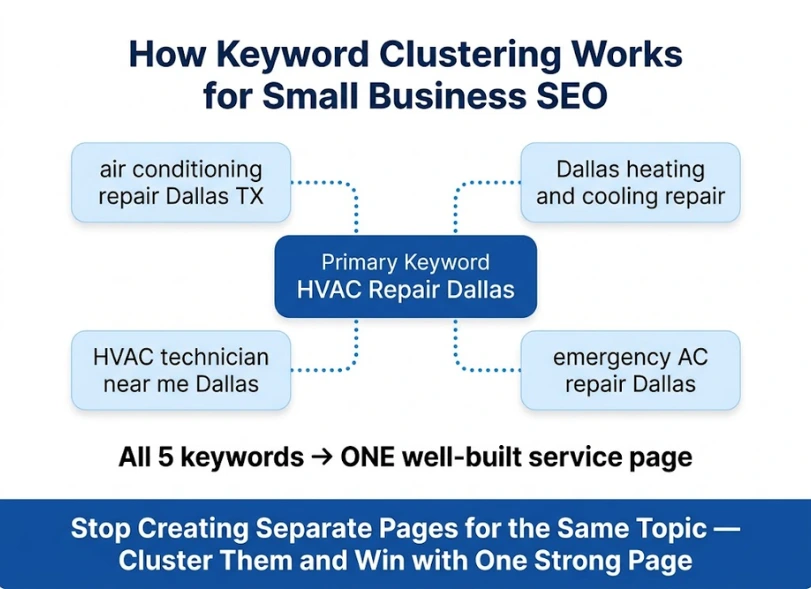
Now that you have a working list of keywords, don’t treat them all as separate targets. Group related keywords together. This is called keyword clustering — and it’s one of the smarter parts of an effective SEO strategy for small businesses.
What keyword clustering means
A keyword cluster is a group of related keywords that share the same search intent and can be addressed by a single, well-written page.
How to group similar terms under one page
Instead of writing a separate page for “plumber Austin,” “plumber in Austin TX,” and “Austin plumbing services” — put them all on one page. They mean the same thing, target the same user, and belong together.
Avoid keyword cannibalization
Keyword cannibalization happens when you create multiple pages targeting the same or very similar keywords. Instead of helping each other, they compete against each other in Google — and both rank lower as a result.
Example cluster for a small business service page
Page topic: HVAC repair in Dallas
Primary keyword: HVAC repair Dallas
Cluster keywords: air conditioning repair Dallas TX, Dallas heating and cooling repair, HVAC technician near me Dallas, emergency AC repair Dallas
All of these can naturally appear on one well-built service page.
Step 7: Map Keywords to the Right Pages on Your Website
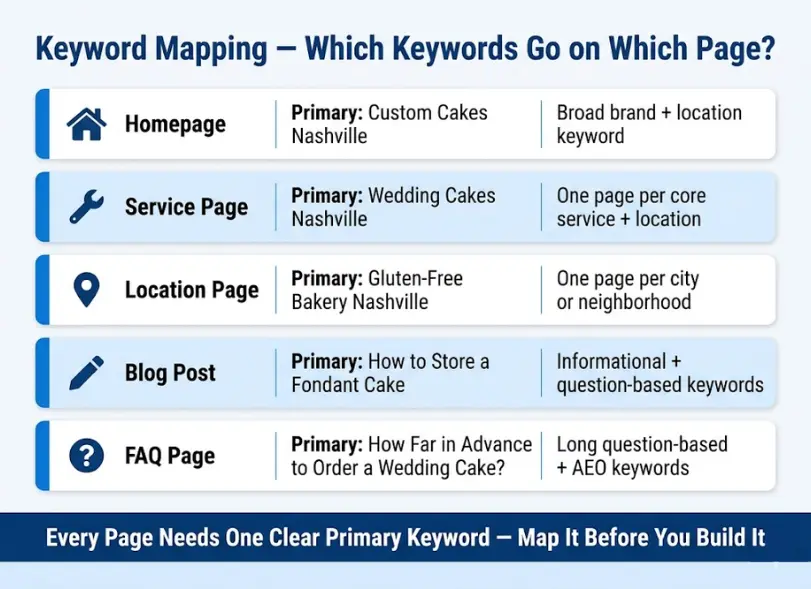
Keyword mapping is the process of assigning specific keywords to specific pages. This is the bridge between your keyword research and your actual website. It’s also where a lot of the SEO keywords for small business websites get wasted — because nobody took the time to map them properly.
Homepage keywords
Your homepage should target your most important, broad brand-plus-location or service keyword. Think: “digital marketing agency New York” or “accounting firm Chicago.”
Service page keywords
Each core service gets its own dedicated page — and its own primary keyword cluster. Don’t try to put all your services on one page. A well-structured small business website gives each service room to rank.
Location page keywords
If you serve multiple cities or neighborhoods, build a dedicated page for each location. “Roofing contractor Dallas,” “roofing contractor Fort Worth,” and “roofing contractor Plano” are three separate pages — not one.
Blog post keywords
Blog posts should target informational and question-based keywords. They’re how you attract people at the top of the buying journey and build authority over time.
FAQ/support content keywords
FAQ pages work well for long, specific question-based searches. These are also excellent for AEO (Answer Engine Optimization) — appearing as direct answers in Google’s featured snippets and AI-generated answers.
Keyword Research Example for a Small Business Website
Let’s make this real. Here’s how keyword research looks in practice for a local bakery.
Example business: Local bakery in Nashville, TN
Seed keyword list: – Custom cakes Nashville – Wedding cakes Nashville – Birthday cakes Nashville – Gluten-free bakery Nashville – Dessert catering Nashville
Expanded keyword list (after using tools): – Custom birthday cakes Nashville TN – Gluten-free wedding cake bakery Nashville – Dessert catering for corporate events Nashville – Best wedding cake bakery Nashville – Order custom cakes online Nashville
Intent sorting:
| Keyword | Intent | Page Type |
|---|---|---|
| “gluten-free wedding cake bakery Nashville” | Commercial | Service page |
| “how to store a fondant cake” | Informational | Blog post |
| “order custom birthday cake Nashville” | Transactional | Product/service page |
| “dessert catering near me Nashville” | Local | Location/service page |
Final keyword mapping:
| Page | Primary Keyword | Supporting Keywords |
|---|---|---|
| Homepage | Custom cakes Nashville | Nashville bakery, cake shop Nashville |
| Wedding Cakes page | Wedding cakes Nashville | Gluten-free wedding cake Nashville, best wedding cake bakery Nashville |
| Birthday Cakes page | Custom birthday cakes Nashville | Birthday cake order Nashville TN |
| Catering page | Dessert catering Nashville | Corporate dessert catering Nashville |
| Blog: Cake Storage | How to store a fondant cake | Fondant cake tips, keeping wedding cake fresh |
Clean, organized, and ready to build.
Best Keyword Research Tools for Small Businesses
You don’t need to spend a fortune. Here’s a breakdown of the best tools at each level.
Best free tools
- Google Keyword Planner – Volume ranges and keyword ideas (requires a Google Ads account)
- Google Autocomplete + PAA + Related Searches – Free real-time data straight from Google
- Google Trends – Great for seasonal and trending keyword research
- AnswerThePublic (limited free searches) – Question-based keyword discovery
Best low-cost tools
- Ubersuggest – Affordable, beginner-friendly, solid for small businesses just getting started
- Mangools (KWFinder) – Clean interface, great for local keyword research, reasonably priced
Best advanced tools
- Ahrefs – The gold standard for keyword research and competitor analysis
- Semrush – Extremely powerful for both keyword research and full SEO audits
Which tool type is right for which stage of business growth
Just starting out? Stick to free tools — Google Keyword Planner, and Google Autocomplete will get you surprisingly far.
Growing and ready to invest? Ubersuggest or KWFinder gives you real data without enterprise pricing.
Scaling up or working with an agency? Ahrefs or Semrush will give you the full picture and a significant competitive edge. A good digital marketing agency will already be using one of these on your behalf.
5 Common Keyword Research Mistakes Small Businesses Should Avoid
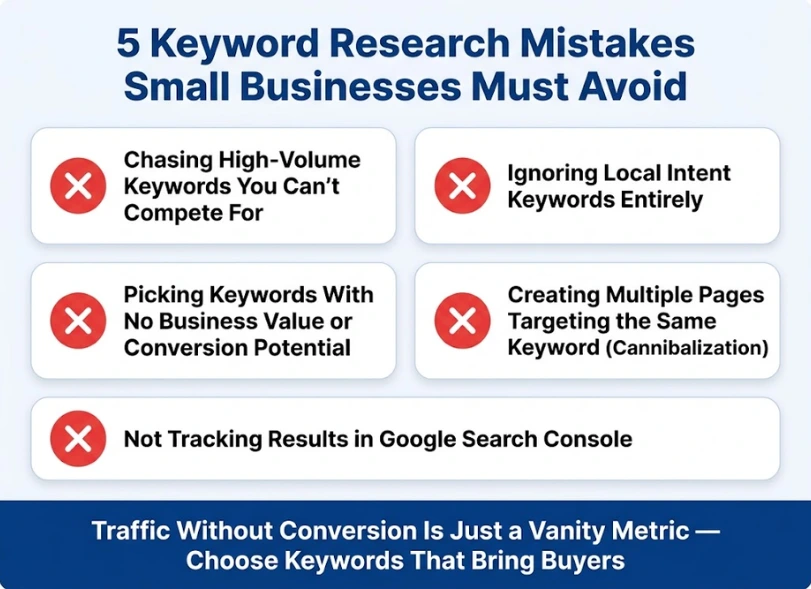
Knowing what not to do is just as important as knowing the right steps.
Targeting only high-volume keywords
This is the most common mistake. High-volume keywords are almost always dominated by brands with enormous authority and massive content teams. As a small business, you’ll waste months of effort trying to rank for terms you can’t realistically compete for.
Ignoring local intent
If you serve a specific area, local keywords are your fastest path to rankings. Every local business that skips local SEO is leaving the most accessible wins on the table.
Choosing keywords without business value
Traffic without conversion is just a vanity metric. A keyword like “interesting facts about plumbing” might bring visitors — but none of them will call you to fix their pipes. Prioritize keywords with commercial or transactional intent.
Creating multiple pages for the same keyword
Keyword cannibalization will quietly tank your rankings. Don’t build five blog posts all targeting “small business bookkeeping tips.” Pick one, build it out properly, and link to it from the others.
Not tracking results
SEO without tracking is just guessing. Set up Google Search Console from day one, and check your data regularly. You can’t improve what you don’t measure.
Final Thoughts
Here’s the truth: you don’t need the biggest keywords to build a successful online presence for your small business. You need the right keywords.
The right keywords are the ones your ideal customers are actually typing. They match what you offer, reflect clear search intent, and give you a realistic shot at ranking. That’s it.
Start with a focused seed list. Expand it with free tools. Understand the intent behind each term. Group them into clusters. Map them to pages. Prioritize with a simple scoring model. And track your results over time.
If you want help building this kind of keyword strategy for your business, the team at PromotEdge Digital works with small businesses and growing brands to develop SEO strategies that actually move the needle. And if you’re thinking about what broader digital marketing strategies sit alongside SEO, that’s worth exploring too.
FAQs About Keyword Research for Small Business
-
What is keyword research for small businesses?
Ans.Keyword research for small business is the process of finding the specific words and phrases your potential customers type into Google when they’re looking for your products or services. The goal is to identify keywords that are relevant, realistic to rank for, and likely to bring in paying customers — not just random visitors. -
How do I find keywords for my small business website?
Ans.Start by brainstorming a seed list based on your services, problems you solve, and the locations you serve. Then use free tools like Google Autocomplete, Google Keyword Planner, and Google Search Console to expand and validate that list. Look at what your competitors rank for, and focus on long-tail, local, and intent-matched keywords. -
Are free keyword research tools enough?
Ans.For most small businesses just getting started, yes — free tools like Google Search Console, Keyword Planner, and Google Autocomplete can get you very far. As you grow and want deeper data on competitor rankings and keyword difficulty, upgrading to a paid tool like Ahrefs or SEMrush becomes worthwhile. -
Should small businesses focus on long-tail keywords?
Ans.Absolutely. Long-tail keywords are more specific, less competitive, and attract visitors who know what they want. A keyword like emergency HVAC repair Austin TX gets fewer monthly searches than HVAC repair — but the person typing it is ready to hire someone right now. That’s the kind of traffic that converts. -
How many keywords should I target per page?
Ans.Focus on one primary keyword per page. You can naturally include several related secondary keywords and variations within the same page — but every page needs one clear main focus. Trying to rank for too many unrelated terms on one page will dilute your efforts and confuse search engines. -
How often should I update my keyword strategy?
Ans.Review your keyword strategy at least once every quarter. Use Google Search Console to find keywords where you’re close to page one, refresh content that’s become outdated, and look for new keyword opportunities that match changes in your business or your customers’ behavior. -
What is the difference between short-tail and long-tail keywords?
Ans.Short-tail keywords are broad, usually one to two words (like plumber or accountant). They have high search volume but extremely high competition. Long-tail keywords are longer, more specific phrases (like affordable accountant for small business owners in Chicago). They have lower volume but far less competition and higher conversion rates — making them ideal for small businesses. -
How do I know if a keyword is too competitive for my small business?
Ans.Check who’s ranking on page one for that keyword. If the top five results are all major national brands, large news sites, or industry giants, that keyword is likely out of reach for now. Look for keywords where at least some of the top results are small or mid-size websites — those are your realistic opportunities.
Author Details

Latest Posts
-
 30 / Oct
-
 24 / Oct
-
 22 / Sep
Digital Marketing Digital Marketing for Ecommerce Brands: The 2027 Growth Playbook
22 / Sep
Digital Marketing Digital Marketing for Ecommerce Brands: The 2027 Growth Playbook -
 15 / Sep
-
 04 / Sep
Blogs
Journey into Ideas Unveiling Tomorrow's Insights Today.






-
What is keyword research for small businesses?
Ans.Keyword research for small business is the process of finding the specific words and phrases your potential customers type into Google when they’re looking for your products or services. The goal is to identify keywords that are relevant, realistic to rank for, and likely to bring in paying customers — not just random visitors. -
How do I find keywords for my small business website?
Ans.Start by brainstorming a seed list based on your services, problems you solve, and the locations you serve. Then use free tools like Google Autocomplete, Google Keyword Planner, and Google Search Console to expand and validate that list. Look at what your competitors rank for, and focus on long-tail, local, and intent-matched keywords. -
Are free keyword research tools enough?
Ans.For most small businesses just getting started, yes — free tools like Google Search Console, Keyword Planner, and Google Autocomplete can get you very far. As you grow and want deeper data on competitor rankings and keyword difficulty, upgrading to a paid tool like Ahrefs or SEMrush becomes worthwhile. -
Should small businesses focus on long-tail keywords?
Ans.Absolutely. Long-tail keywords are more specific, less competitive, and attract visitors who know what they want. A keyword like emergency HVAC repair Austin TX gets fewer monthly searches than HVAC repair — but the person typing it is ready to hire someone right now. That’s the kind of traffic that converts. -
How many keywords should I target per page?
Ans.Focus on one primary keyword per page. You can naturally include several related secondary keywords and variations within the same page — but every page needs one clear main focus. Trying to rank for too many unrelated terms on one page will dilute your efforts and confuse search engines. -
How often should I update my keyword strategy?
Ans.Review your keyword strategy at least once every quarter. Use Google Search Console to find keywords where you’re close to page one, refresh content that’s become outdated, and look for new keyword opportunities that match changes in your business or your customers’ behavior. -
What is the difference between short-tail and long-tail keywords?
Ans.Short-tail keywords are broad, usually one to two words (like plumber or accountant). They have high search volume but extremely high competition. Long-tail keywords are longer, more specific phrases (like affordable accountant for small business owners in Chicago). They have lower volume but far less competition and higher conversion rates — making them ideal for small businesses. -
How do I know if a keyword is too competitive for my small business?
Ans.Check who’s ranking on page one for that keyword. If the top five results are all major national brands, large news sites, or industry giants, that keyword is likely out of reach for now. Look for keywords where at least some of the top results are small or mid-size websites — those are your realistic opportunities.