


WordPress Speed Optimization Checklist for Small Business Sites (Core Web Vitals Fixes)

-
Updated Date
Aug-20-2026
-
Views
2 Min Read
-
Author: PromotEdge Digital
-
Updated Date: Aug-20-2026
-
Views: 2 Min Read
-
Author: Milan Shyamal
Optimize your WordPress site by improving hosting, using lightweight themes, compressing images, enabling caching, minifying CSS/JS, using a CDN, and cleaning the database. These fixes improve Core Web Vitals, boost SEO rankings, enhance user experience, and increase conversions.
WordPress speed optimization is the process of improving your WordPress website’s load time, Core Web Vitals scores, and overall performance so pages load in under 2.5 seconds. It covers seven key areas: web hosting quality, theme efficiency, image compression, browser caching, CSS/JS minification, CDN deployment, and database cleaning.
Speed directly impacts revenue. A one-second delay in page load time reduces conversions by 7% (Google). Pages that load in 5 seconds have a 38% bounce rate — compared to just 6% for pages loading in 2 seconds (Pingdom, 2025). This checklist covers every fix, from beginner wins to advanced technical optimisations, to bring your WordPress site under the 2.5-second LCP threshold Google recommends for a ‘Good’ Core Web Vitals score.
Slow loading websites negatively impact small businesses. They typically lose traffic, revenue and their positions in search engine results. According to a recent study, websites with a loading time of over 3 seconds have a 53% higher bounce rate. So, here we are going to help you with the WordPress website speed optimization checklist. This includes correct issues that contribute to low core web vitals (LCP, INP and CLS), as well as improve loading times under 2.5 seconds.
Understanding Website Speed
The speed at which a website loads determines whether a visitor will remain on the page or leave. Websites built on WordPress by small businesses can increase conversion rates by 7% for each second that the website saves in loading time.
Google’s measures of Core Web Vitals are based on real user’s experiences. Thus, websites that take too long to load will have poor SEO performance and generate fewer sales.
Typical reasons for poor performance include:
- Heavy Themes,
- Unoptimized Images,
- Poor Quality of the Hosting Provider,
So, the fixes for these issues are necessary to help business owners gain rapid improvements in their online presence.
Quick Answer: How Do You Speed Up a WordPress Website?
To speed up a WordPress website, apply these 7 optimisations in order of impact:
- Upgrade to managed WordPress hosting with SSD and built-in caching
- Use a lightweight theme (under 100KB page weight)
- Compress and lazy-load all images (target: under 200KB each)
- Enable page caching with WP Rocket or LiteSpeed Cache
- Minify CSS and JavaScript files (20-40% file size reduction)
- Deploy a CDN (Cloudflare free tier is sufficient for most sites)
- Clean the WordPress database quarterly with WP-Optimize
Why is Website Speed Optimization Essential?
Website speed is important to Google ranking algorithm. Webpages that load in under 2 seconds convert at 32% higher rate than those that take longer than 2 seconds to load.
Google suggests that mobile users might abandon webpages that take too long to load. So small business owners should pay attention to the mobile user experience. The fixes noted in the core web vitals fixes for WordPress websites should produce “green” scores in PageSpeed Insights.
- Core Web Vitals like Largest Contentful Paint (LCP) under 2.5s show main content loads fast.
- Interaction to Next Paint (INP) below 200ms means clicks respond instantly.
- Cumulative Layout Shift (CLS) under 0.1 prevents jarring page jumps.
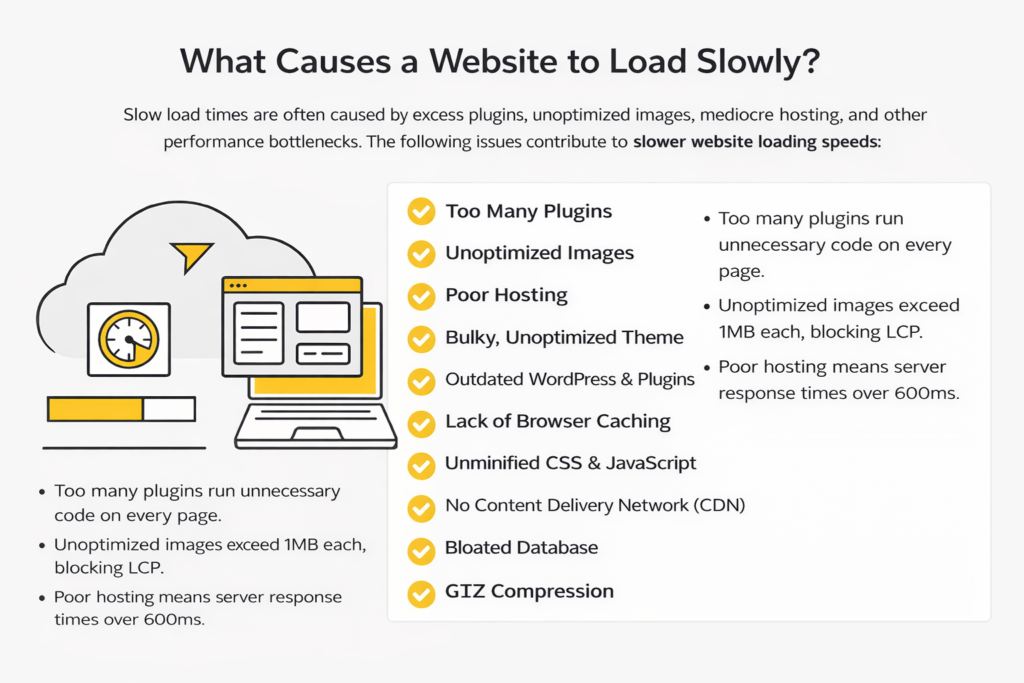
What Causes a Website to Load Slowly?
Long load times and poor user experience on a WordPress site are typically caused by bloat of excess plugins. Besides, the presence of large image files, limitations of shared web hosting for high-traffic sites, and un-optimized code and databases also affect the speed. The bloat from these different causes leads to the following seven issues:
- Too many plugins run unnecessary code on every page.
- Unoptimized images exceed 1MB each, blocking LCP.
- Poor hosting means server response times over 600ms.
The WordPress site speed optimization checklist starts with basic issues then builds up to more technical or advanced issues. It focuses on improving your website’s Core Web Vitals directly.
For example, if you’re a small business, you will see the largest improvement from simple wins like choosing a better web host or reducing the size of your image files. These two changes alone can help decrease your site load time below 3 seconds, improving your overall search engine optimization and increasing customer trust.
1. Hosting Provider Selection
Selecting an appropriate hosting company is the foundation of a speed strategy, as server response times have a direct impact on LCP and overall Core Web Vitals scores.
When traffic spikes occur, many shared hosting packages become overloaded, resulting in longer load times that frustrate users and hurt website rankings.
Instead, choose managed WordPress hosting companies that use SSD storage, LiteSpeed servers, and built-in caching, resulting in response times under 200 milliseconds.
2. Theme Selection for Easy Customization
By using a lightweight theme, you avoid having a large bulk of additional files that could slow down your website.
It allows for clean, fast-loading code without having bulky CSS or scripts that can mess with your layout and, therefore, impede your CLS (UX).
Themes that have large amounts of added files (500kb +) can delay rendering. Choose an Astra, GeneratePress or Kadence theme, with a base size of less than 50kb and designed for mobile first experience.
With these themes, you can customize your site easily through a customizer and that too requires no experience in HTML or CSS coding. This means that the theme will remain visually stable and LCP will decrease between 1-2 seconds.
3. Time-to-Time WordPress Updates
By consistently updating the WordPress core, themes and plugins, you can eliminate performance bugs and understand how to leverage PHP 8.2’s 30% increase in speed.
Any outdated installations can leak memory, which decreases the INP response time. To alleviate this risk, schedule time every month via your dashboard to check for updates.
If you would like to automate this process, consider utilizing a plugin, such as Easy Updates Manager. You should also have a backup solution prior to performing any updates via UpdraftPlus.
Most updates will contain speed improvements, therefore after running an update, you should clear all caches and re-test the vitals.
4. Image Optimization
Unoptimized images are the most significant contributor to page weight, which can push LCP to more than 4 seconds on mobile devices, where approximately 53% of visitors will abandon a site that loads slowly. Use ShortPixel or Imagify plugins to reduce JPEG file size to 80% quality and convert the format to WebP.
Then, you can resize images to match their display size. Implement lazy loading for images located below the fold. By following these steps, page load sizes can be reduced from 2MB to 200KB. WordPress sites see improvements in their Core Web Vitals Fixes due to the implementation of these steps.
5. Browser Cache Optimization
Browser caching enables repeated visitors to access the static files on your website without having to download them again. This significantly reduces the time needed to load your website by 50-80% the second time they visit, plus enhancing the INP smoothness when navigating.
When browser caching is not in place, the CSS will be downloaded each time a static page is accessed. You can use a caching solution such as WP Rocket or LiteSpeed Cache to configure expiration headers. It should be within your WordPress website speed optimization checklist.
6. CSS and JavaScript File Minification
When a CSS or JS file is minified, it’s like removing unnecessary space and comments from the text. This reduces the size of that file by anywhere from 20-40% without losing any functionality.
Minifying that CSS/JS file will allow it to be parsed faster and reduce the amount of cumulative layout shift caused by render-blocking resources.
In essence, the non-minified version of those files will create a bloated payload (size) and add time delays during page loading.
The use of plug-ins like Autoptimize or WP Rocket will help developers optimize the inline/outline merge of CSS/JS files. These methods streamline the execution of CSS/JS files and provide a 2.5 second or lower LCP.
All of these methods should be tested to ensure there are no disruptions in service. These are the most important Core Web Vitals fixes to make to your WordPress site if you run a script-heavy site.
7. Implementation of Content Delivery Network (CDN)
CDNs provide end users with access to the assets they are using on a web page. As a result, CDN companies use edge servers that are as close as possible to the users to provide faster asset download speeds to them. Self-hosted files will take a user 300ms or more to load in from elsewhere in the world.
By using companies such as Cloudflare, BunnyCDN, or KeyCDN that are available through plug-ins, you will reduce download time by up to 80% from your own server. Only enable access to static resources through the CDN service, and only cache the HTML file at the origin server using smart caching rules.
Using a CDN will save small businesses the time it takes to get their website set up and running internationally. They will have three times the amount of potential customers in their geographic regions if they use CDN services.
8. Database Optimization
In WordPress your database becomes bloated with revisions, trashed items and transients. This causes your database to take longer to respond to queries. Thus, increasing both the INP time and the time it takes to load your complete site.
Cleaning your database every quarter is a good way to prevent this from occurring. Use a plugin such as WP-Optimize or the Advanced Database Cleaner to help you do this; you should also setup the following:
1) Limit the number of revisions to 3, automatically delete any spam comments.
2) Optimize the tables in your database and rebuild any indexes.
3) Schedule Cron jobs to run regular maintenance tasks.
4) Use the Query Monitor plugin to identify and troubleshoot slow performing database queries.
5) Use object caching available from your host to help reduce the Time To First Byte (TTFB) by 100 ms.
6) Make sure that you’re only using object caching for your content sites with 1000+ posts and to keep all Core Web Vitals in the same range as your average from your database performance.
9. GZIP Compression
By compressing your HTML, CSS and JS files before transferring them over the internet via the GZIP Compression protocol, you will achieve an approximate 70-90% reduction in the size of these file types when they are transferred over the internet.
This reduction in size will save you a significant amount of bandwidth when using a mobile device to access your website due to the slow speed of mobile networks. When using GZIP Compression, web servers will compress files on-the-fly.
You can confirm that GZIP Compression has been properly enabled by using the Developer Tools in your web browser (F12). This will cause a significant drop in the size of the compressed file types when you test. GZIP Compression is one of the easiest and most efficient fixes available today for improving your Core Web Vitals Metrics.
How Does Cleaning the WordPress Database Improve Performance?
Over time, WordPress databases accumulate post revisions, trashed items, spam comments, orphaned plugin data, and transients — all of which increase database query times and directly impact INP (Interaction to Next Paint) and overall page load time.
Over time, WordPress databases accumulate post revisions, trashed items, spam comments, orphaned plugin data, and transients — all of which increase database query times and directly impact INP (Interaction to Next Paint) and overall page load time. Removing unused or old data can prevent site slowdown by over 20% in the long term. WP-Optimize and Advanced Database Cleaner are the two recommended tools. Revisions should be capped at 3 per post, and database cleanups should run quarterly for low-traffic sites and monthly for high-traffic sites.
Final Takeaway
So, this shows how WordPress website speed optimization checklist can help you enhance your presence online. You just need to make use of the given checklist in sequence and your rankings will increase in search engines & retain users to your site.
If Core Web Vitals metrics are indicated as “green”, this reflects that Google loves your site. The initial time budget will be 1-2 days for setup, but will be automatable. You can always consider taking assistance from experts at PromoteEdge Digital. Understanding WordPress development services can also help businesses identify the technical expertise required to implement performance improvements, maintain website health, and support long-term growth.
FAQs
-
Why Should I Prioritize Core Web Vitals When Optimizing My WordPress Site?
Ans.Core Web Vitals measure the real user experience of your website. LCP for loading time. CLS is for visual stability. INP is for your website interaction time. Google has been ranking on Core Web Vitals since March of 2021, so your website's ranking will likely improve after you make these changes to your website (10-20%). -
What is the Best Free Tool to Use for Checking My Website Speed?
Ans.There are 3 (free) tools that we recommend: PageSpeed Insights, GTmetrix, and WebPageTest. We recommend using them on both Mobile & Desktop. All three tools use Lighthouse to check for speed, and they can be used to check the speed of your website on all your plugins. -
How often Should I Clean My WordPress Database?
Ans.If your website receives little traffic (Quarterly), and if your website receives High-Traffic (Monthly). The removal of unused or old data from your database can easily prevent a slowdown in your website by over 20% in the long term. -
Does Using a CDN On My WordPress Site Work?
Ans.Yes! CDNs work on all WordPress Hosting Plans (Shared Hosting included). Cloudflare is the best Free CDN available to you! Cloudflare has developed smart caching algorithms specifically for the Dynamic Content that you would have on your site, therefore, it will help improve speed on the Dynamically Serving Page. -
What are Some Caching Plugins that are Safe (E-Commerce)?
Ans.The 2 (E-Commerce) Caching Plugins that we would recommend using are WP Rocket or LiteSpeed. Both of these Plugins allow you to exclude the Cart and Checkout Pages from being Cached. It is also recommended that you Utilize Preload for High Traffic Peak Times. All tests confirm this.
Author Details

Latest Posts
-
 22 / Sep
Digital Marketing Digital Marketing for Ecommerce Brands: The 2027 Growth Playbook
22 / Sep
Digital Marketing Digital Marketing for Ecommerce Brands: The 2027 Growth Playbook -
 15 / Sep
-
04 / Sep
-
 29 / Jul
Search Engine Optimization 6 Enterprise SEO Mistakes That Quietly Cost You Millions
29 / Jul
Search Engine Optimization 6 Enterprise SEO Mistakes That Quietly Cost You Millions -
 24 / Jul





Blogs
Journey into Ideas Unveiling Tomorrow's Insights Today.

















-
Why Should I Prioritize Core Web Vitals When Optimizing My WordPress Site?
Ans.Core Web Vitals measure the real user experience of your website. LCP for loading time. CLS is for visual stability. INP is for your website interaction time. Google has been ranking on Core Web Vitals since March of 2021, so your website's ranking will likely improve after you make these changes to your website (10-20%). -
What is the Best Free Tool to Use for Checking My Website Speed?
Ans.There are 3 (free) tools that we recommend: PageSpeed Insights, GTmetrix, and WebPageTest. We recommend using them on both Mobile & Desktop. All three tools use Lighthouse to check for speed, and they can be used to check the speed of your website on all your plugins. -
How often Should I Clean My WordPress Database?
Ans.If your website receives little traffic (Quarterly), and if your website receives High-Traffic (Monthly). The removal of unused or old data from your database can easily prevent a slowdown in your website by over 20% in the long term. -
Does Using a CDN On My WordPress Site Work?
Ans.Yes! CDNs work on all WordPress Hosting Plans (Shared Hosting included). Cloudflare is the best Free CDN available to you! Cloudflare has developed smart caching algorithms specifically for the Dynamic Content that you would have on your site, therefore, it will help improve speed on the Dynamically Serving Page. -
What are Some Caching Plugins that are Safe (E-Commerce)?
Ans.The 2 (E-Commerce) Caching Plugins that we would recommend using are WP Rocket or LiteSpeed. Both of these Plugins allow you to exclude the Cart and Checkout Pages from being Cached. It is also recommended that you Utilize Preload for High Traffic Peak Times. All tests confirm this.