


Local SEO Checklist for Small Business [2026] — Rank in Google Maps & AI Search

-
Updated Date
May-02-2026
-
Views
2 Min Read
-
Author: PromotEdge Digital
-
Updated Date: May-02-2026
-
Views: 2 Min Read
-
Author: Milan Shyamal
Local SEO for small businesses is about showing up when people nearby search for what you offer — on Google, Maps, or wherever they’re looking. This checklist walks through 10 things that actually make a difference, from setting up your Google Business Profile and getting listed in the right places to earning reviews, fixing your website, and keeping up with how search is changing in 2026.
If you run a local business — a salon, a plumbing service, a restaurant, a dental clinic — your most valuable customers are people searching near you right now. Local SEO is the practice of making sure your business shows up when they do.
Here’s the reality: 86% of people look up local businesses on Google Maps before they decide to visit the business. And when someone searches “near me,” there’s a strong chance they’ll visit a place within the same day or next day. If your business isn’t showing up in Google’s Local Pack — the map results people see first — you’re simply not in front of customers who are ready to walk in or call.
So what’s different about 2026 compared to before? Google’s AI Mode and AI Overviews have fundamentally changed how local results are surfaced. Businesses no longer just need to rank; they need to be recognized as trusted entities by Google’s agentic search system (source: Morning Star). That means consistent data, verified credibility, semantic-rich content, and structured signals that speak to both humans and AI.
This local SEO checklist for small businesses keeps things simple and practical — the stuff that actually helps people find your business nearby, including the newer AI changes most businesses are still catching up on.
Local SEO Checklist for Small Businesses — 10 Steps That Actually Help You Get Found Nearby
Step 1: Set Up and Properly Optimize Your Google Business Profile
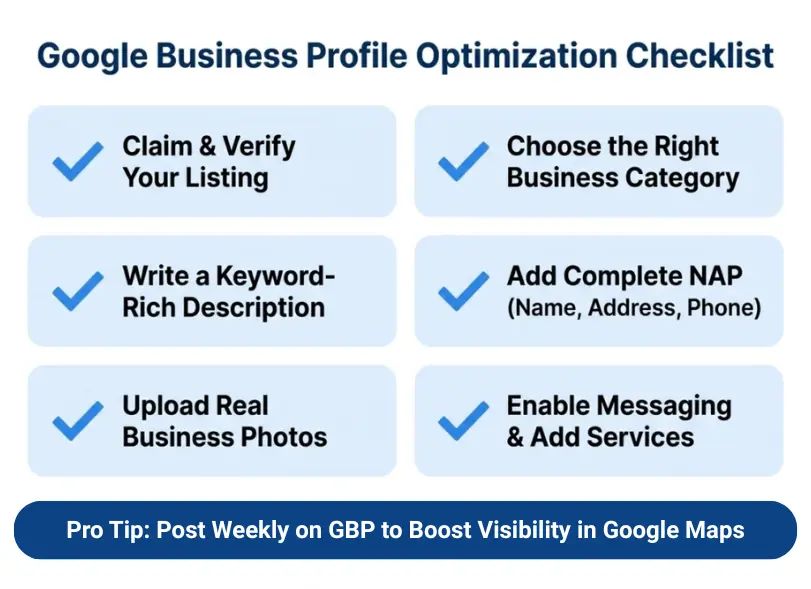
Google Business Profile is the foundation of every local SEO strategy. It powers the “map pack” results that appear above organic listings for nearly every local search query.
What to do:
- Claim and verify your listing at google.com/business. If your business is already listed, claim it. Verification is usually done via postcard, phone, or video.
- Select the most accurate primary and secondary categories.Your main category matters a lot — it tells Google what your business is really about. So pick the one that fits your core service as closely as possible. For example, go with “Plumber” instead of something broad like “Home Services.”
- Write a keyword-rich business description. Then, write a simple description that clearly explains what you do, where you operate, and how you help your customers. Keep it short and to the point — under 750 characters is ideal.
- Add complete NAP (Name, Address, Phone). Your business name should be your real-world brand name — no keyword stuffing. Your address and phone must be 100% consistent with every other online listing.
- Add real, good-quality photos of your business. It genuinely makes a difference—places with photos tend to get more direction requests and more clicks to their website.
- Don’t overthink it. Just show what a customer would want to see: how your place looks from outside, what it’s like inside, your products, and the people behind the business. It builds trust before someone even contacts you.
If you don’t have a shop people can visit—like if you go to the customer—just mention the areas you work in. That way, someone can tell right away if you cover their location.
Put up a proper list of what you offer. Not just names—add a line or two explaining each service. If you can share pricing, even better. It answers the basic questions before they even ask.
And keep messaging on. A lot of people won’t call straight away—they’ll send a quick message first. If that option isn’t there, they’ll move on.
Pro Tip: Post to your GBP at least once per week using the “Updates” or “Offers” feature. Active profiles receive higher visibility in Google Maps and AI Overviews.
Step 2: Make Sure Your Name, Address, and Phone Number Match Everywhere
What is NAP? NAP is your business name, address and phone number. It’s basic, but this is where things often go wrong. One place has an old number, another shows a slightly different name, somewhere the address is written differently. Keeping it the same everywhere keeps things clear and helps your business look reliable to Google.
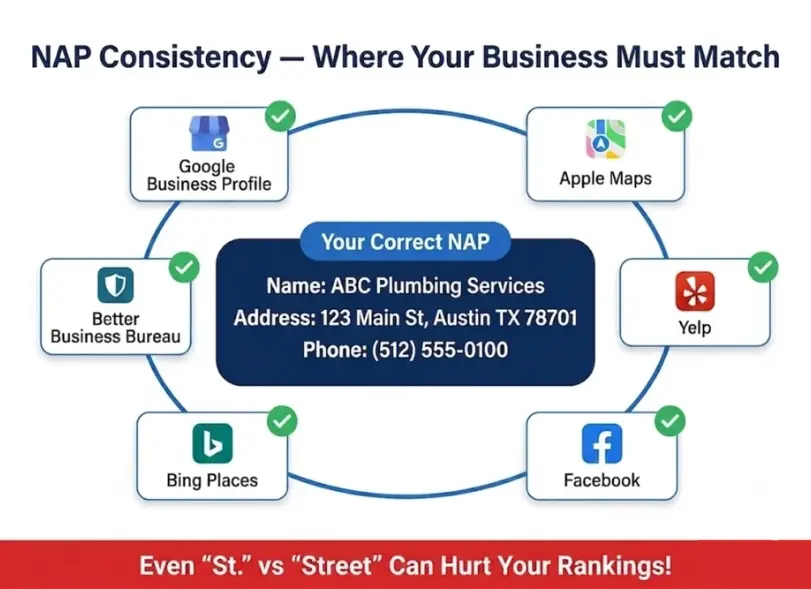
Inconsistencies — even minor ones like “St.” vs. “Street” or two different phone numbers — confuse Google’s entity verification system and suppress your local rankings.
What to do:
Start by checking where your business already shows up online. Tools like Moz Local, BrightLocal, or Whitespark can help you find these listings and spot anything that doesn’t look right.
Once you’ve got that, fix your details. Your name, address and phone number should be written the same way everywhere—on your website, your Google Business Profile, your social pages, and any directories. Even small differences can throw things off.
Then make sure you’re listed on the main platforms people actually use—Google Business Profile, Apple Maps, Bing Places, Yelp, Facebook Business Page, and Better Business Bureau. These are the listings most people check, so it’s worth getting them right.
Target industry-specific directories. A restaurant should be on OpenTable and TripAdvisor. A contractor should be on Houzz and HomeAdvisor. A law firm should be in Avvo and Justia.
Get listed on data aggregators: Foursquare, Data Axle, and Localeze feed information to hundreds of smaller directories automatically.
Monitor and fix citation errors regularly — at least once per quarter.
Special Note: A BrightLocal study shows that 93% of consumers get frustrated by incorrect business information online, and 80% lose trust when contact details are inconsistent.
Step 3: Get Your Website Ready for Local Search
Your website should clearly show where you work and what you offer, so it’s easy for Google to understand your business. Without local signals embedded in your pages, even the best GBP can struggle to rank.
What to do:
Homepage and key service pages:
- Include your city/region in the title tag (e.g., <title>Plumbing Services in Austin, TX | [Business Name]</title>)
- Add city and region in your H1 and naturally throughout the page body
- Put a Google Map on your Contact page. It sounds basic, but it helps people trust that you’re a real, reachable business—and it makes getting directions effortless.
- Keep your business name, address, and phone number visible in the footer on every page. Don’t overthink it. Just write it out clearly as text so both users and search engines can see it without digging.
- Your phone number should be clickable. Most people are on their phones—if they have to copy and paste your number, there’s a good chance they won’t bother.
- If you work across different areas, give each location its own page. And don’t just swap out the city name and call it done. Talk about that place properly—what services you offer there, what kind of customers you usually help, anything that makes it feel real.
- Also, think about how people actually search when they need something. Nobody types like a robot.
They search for things like “near me” or “closest option.” Your content should reflect that naturally, not force it in awkwardly.
- “Best [service] in [city]” content
- “[Service] cost in [city]” guides
- Local case studies and project showcases with location context
When you write your page titles and meta descriptions, don’t just throw in keywords for the sake of it. Include your main keyword along with the city you serve so it actually makes sense to someone searching. And instead of sounding generic, use words that make people feel confident clicking—like “trusted,” “top-rated,” or “fast response.”
Use header tags semantically:
- H1: Primary keyword + city
- H2: Service categories, question-based headings
- H3: Subtopics and FAQs
For actionable digital marketing strategies tailored to small businesses, explore our guide on digital marketing strategies for small businesses.
Step 4: Implement Local Business Schema Markup
Schema markup is structured data that helps Google (and AI systems) understand your business entity. In 2026, Google looks beyond just your star rating. It actually reads what people are saying in your reviews. The words matter now—whether customers mention things like quick response, professionalism, or how you handled an issue.
So a business with a slightly lower rating but detailed, genuine reviews will often come out ahead of one with a near-perfect score and barely any real feedback.
So what should you actually do?
- Start by adding a LocalBusiness schema to your homepage. If your business fits into a specific category—like a plumber, restaurant, or medical service—use that more precise schema type instead. Do the same for your location pages so Google clearly understands what you do and where you operate.
- Include these fields in your schema:
- name, address, telephone, openingHours
- geo (latitude and longitude coordinates)
- priceRange
- areaServed
- sameAs (links to your GBP, Facebook, Yelp, etc. — this helps Google verify your entity)
- Add Review schema to pull star ratings into search results
- Add FAQ schema to your FAQ sections for rich results visibility
- Validate your schema using Google’s Rich Results Test
- Add Review schema to pull star ratings into search results
- Add FAQ schema to your FAQ sections for rich results visibility
- Validate your schema using
Step 5: Build and Manage Your Online Review Strategy
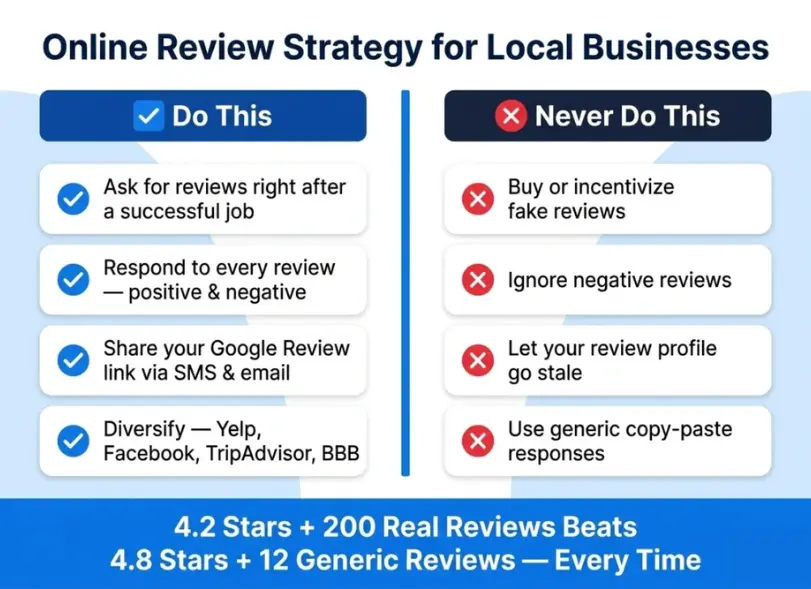
Online reviews are one of the top 3 local ranking factors in Google’s algorithm. Quantity, recency, and sentiment of reviews all directly influence your position in the Local Pack.
In 2026, Google’s AI doesn’t just count star ratings — it performs sentiment analysis on review text, extracting specific service mentions, emotional tone, and resolution patterns. A business with 4.2 stars and 200 reviews that mention “fast response” and “professional” will outperform a business with 4.8 stars and 12 generic reviews.
What to do:
- Create a Google Review link via your GBP dashboard and share it via email, SMS, receipts, and QR codes.
- Ask for reviews at the right moment — right after a successful job or purchase, when customer satisfaction is highest.
- Respond to every review — positive and negative. Responding shows Google you are an active, accountable business. For negative reviews, respond professionally and offer to resolve the issue.
- Never buy or incentivize reviews — Google will penalize this and it violates their Terms of Service.
- Diversify review platforms beyond Google: Yelp, Facebook, TripAdvisor, industry-specific platforms, and the BBB all contribute to your overall authority.
- Include keywords naturally in your responses (e.g., “Thank you for choosing [Business Name] for your HVAC repair in [City]”) — these become indexed content.
AEO Tip: Google’s AI Overviews frequently cite businesses with high review velocity (recent reviews consistently coming in) over businesses with older, static review profiles.
Step 6: Publish GBP Posts Regularly
Google Business Profile Posts are an underused ranking lever. They function like mini social media posts within Google Search and Maps.
What to do:
- Post at minimum once per week
- Use post types strategically: “What’s New” for general updates, “Offers” for promotions (adds a “View Offer” CTA button), “Events” for local happenings
- Include a Call-to-Action in every post (Book Now, Call Now, Learn More)
- Use local keywords naturally within post content
- Add photos to every post — posts with images get significantly more engagement
- Posts expire after 7 days (except Events and Offers), so keep a content calendar
Step 7: Build Local Backlinks and Authority
If you think about it, local SEO isn’t just about your website. It’s also about who’s talking about you online.
When other local websites mention your business, it tells Google you’re actually part of that area—not just trying to rank there.
The easiest place to start is your local Chamber of Commerce. Most businesses ignore it, but it’s one of those links that actually carries weight.
From there, just look around your community. Local events, small sponsorships, charity drives—these things usually come with a mention on their website. It’s not even about SEO at that point, you’re just being involved, and the links come naturally.
You’ll also notice that some businesses work well together. A photographer and a florist, a contractor and an interior designer. When you collaborate, you end up mentioning each other online, and that helps both sides.
If you’ve got something worth sharing—maybe a new service or a milestone—send it to a local paper or media site. Even a small feature adds credibility.
Writing for local blogs or contributing your opinion somewhere also helps. It’s a slow build, but it positions you as someone who knows what they’re doing.
And if you ever get listed on a school or government website, that’s a big win. Those links carry trust.
At the end of the day, one strong local mention beats a bunch of random directory links. Always.
What to do:
- Get listed in your local Chamber of Commerce — these are high-authority, geographically relevant links.
- Sponsor local events, charities, and sports teams — you’ll typically get a mention and a link on their website.
- Partner with complementary local businesses for cross-promotion and backlink exchanges (e.g., a wedding photographer partnering with a florist).
- Submit press releases to local newspapers and media outlets about newsworthy business events.
- Guest post on local blogs or contribute expert columns to local news sites.
- Engage in community events and get featured in local roundup articles.
- Earn links from local .edu and .gov sources where possible (e.g., being featured as a community partner on a school website).
Link quality rule: One link from the local Chamber of Commerce or a respected regional news outlet is worth more than 50 generic directory links.
See how PromotEdge builds authority-first digital marketing strategies as a full-service digital marketing agency serving businesses across the US.
Step 8: Optimize for Mobile and Core Web Vitals
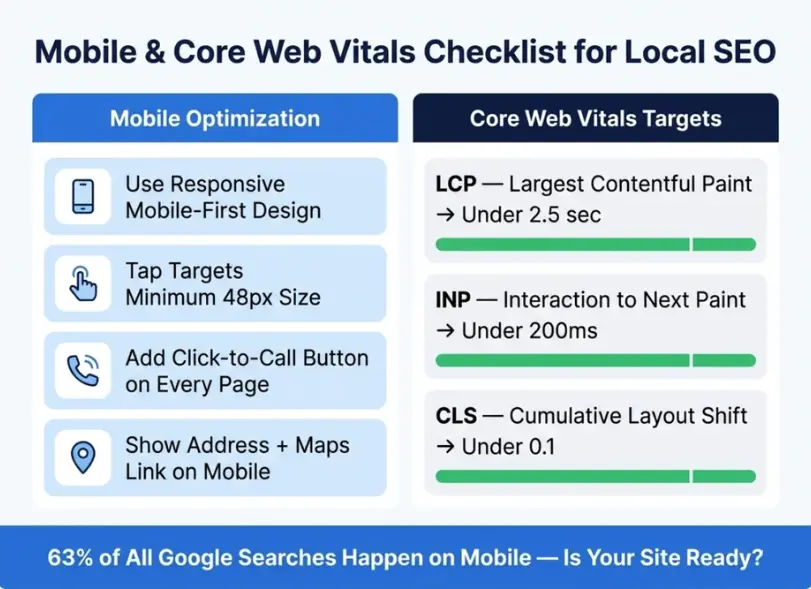
Now think about how people actually search. Most of the time, they’re on their phone. Maybe they’re in a hurry, maybe they just need a quick answer. If your site takes too long to load or feels clunky, they’re gone. They won’t wait. So don’t overcomplicate it. Your site should open fast, look clean on a phone, and make it easy to take action—call, find directions, or check your services. This part isn’t really about SEO tricks. It’s just basic usability. If your site feels easy to use, people stay. If it doesn’t, they leave.
Over 63% of searches are conducted on mobile devices. A slow, poor-performing mobile site will hurt both your user experience and your local rankings.
What to do:
Mobile optimization:
- Use a responsive, mobile-first web design
- Ensure tap targets (buttons, links) are at least 48px in size
- Use click-to-call buttons with your phone number
- Place your address and a maps link prominently on mobile
- Test your mobile experience at Google Search Console’s Mobile Usability Report
Core Web Vitals:
- LCP (Largest Contentful Paint): Should be under 2.5 seconds. Optimize images, enable caching, use a CDN.
- INP (Interaction to Next Paint): Should be under 200ms. Minimize JavaScript execution time.
- CLS (Cumulative Layout Shift): Should be under 0.1. Set explicit width and height attributes on images and embeds.
Technical quick wins:
- Enable HTTPS (required for trust signals)
- Submit an XML sitemap to Google Search Console
- Fix crawl errors in Search Console
- Ensure your website loads in under 3 seconds on mobile networks
PromotEdge builds SEO-optimized, performance-first websites. Explore our WordPress development services and e-commerce website solutions.
Step 9: Optimize for Voice Search and “Near Me” Queries
Voice search has shifted how local intent is expressed. Queries are now longer, conversational, and phrased as natural questions: “Where is the best pizza place open near me right now?”
What to do:
- Create a dedicated FAQ section on your website using natural, conversational questions your customers actually ask (see FAQ examples below)
- Target question-based keywords: “How much does [service] cost in [city]?” / “Is [business type] open near me?” / “Who is the best [service provider] in [city]?”
- Use Featured Snippet optimization: Structure your answers with a direct, concise answer in the first sentence, followed by elaboration. This is the content format Google’s AI Overview and voice assistants pull from.
- Optimize for “near me” intent by including your city/region throughout your content — not just once in the footer NAP.
- Optimize your GBP for voice search by ensuring your hours, phone number, and services are always accurate and updated.
Step 10: Track, Measure, and Continuously Improve
What gets measured gets improved. Local SEO is not a one-time setup; it requires ongoing monitoring and iteration.
What to do:
Tracking setup:
- Connect Google Search Console and Google Analytics 4 to your website
- Track local keyword rankings using tools like BrightLocal, Whitespark, or Semrush’s Local Rank Tracker
- Monitor your GBP Insights for: searches, map views, calls, direction requests, website clicks
Key local SEO KPIs to track monthly:
- Local Pack ranking positions for target keywords
- GBP profile views and actions (calls, direction requests, website taps)
- Organic traffic from local/geo-modified keywords
- Number of new reviews and average star rating
- Citation accuracy score
- Website conversion rate from local traffic
Monthly local SEO audit checklist:
- Verify GBP information is accurate and up-to-date
- Check for and respond to new reviews
- Publish at least 2-3 new GBP posts
- Identify and fix any new citation inconsistencies
- Review Search Console for new local keyword opportunities
- Check Core Web Vitals for any performance regressions
Local SEO in 2026: The AI Search Factor
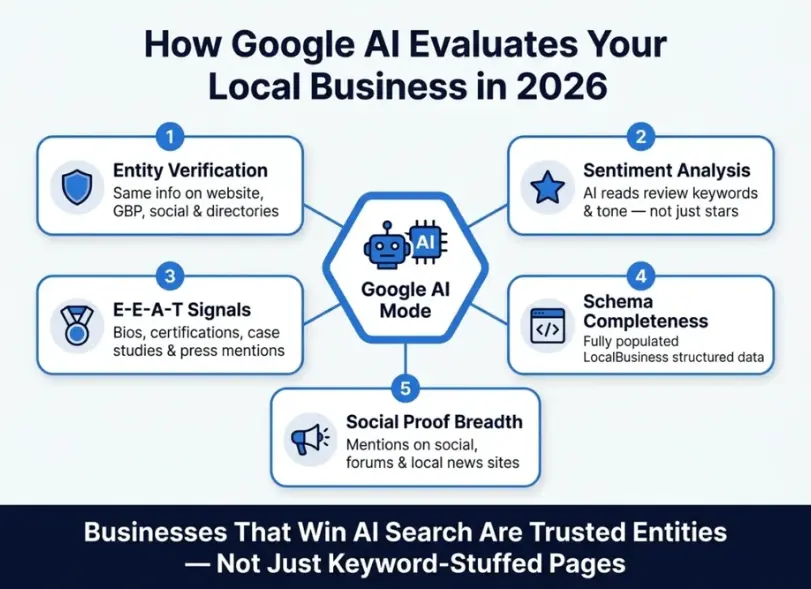
The competitive landscape for local SEO has changed significantly with Google’s rollout of AI Mode and AI Overviews. Here’s what small businesses need to know:
How Google AI Mode Evaluates Local Businesses
Google’s AI doesn’t evaluate businesses the way a traditional algorithm did. It acts more like a research assistant, cross-referencing multiple signals to determine whether your business is a trustworthy, authoritative entity worth recommending.
It looks at:
- Entity verification: Is your business consistently described the same way across your website, GBP, social media, and directories?
- Sentiment analysis: What do your reviews actually say? AI extracts service-specific nouns and emotional tone, not just star ratings.
- E-E-A-T signals: Does your website demonstrate Experience, Expertise, Authoritativeness, and Trustworthiness? Author bios, case studies, certifications, and press mentions all contribute.
- Structured data completeness: Is your LocalBusiness schema fully populated with accurate, verifiable data?
- Social proof breadth: Are you being talked about beyond just Google — on social platforms, local forums, news sites?
How to Optimize for AI Overviews (AEO)
Answer Engine Optimization (AEO) is the practice of structuring content so that Google’s AI can extract and cite it directly in AI Overviews and voice search responses.
AEO best practices for local businesses:
- Use question-based H2/H3 headings that mirror the exact queries your customers type (see FAQ section below)
- Answer questions in the first 1-2 sentences of each section — don’t make Google work to find the answer
- Use schema markup extensively — FAQ schema, Review schema, LocalBusiness schema all increase your chances of being cited in AI-generated results
- Build topical authority by creating a cluster of content around your core services (individual service pages + supporting blog posts + FAQs)
- Earn citations and mentions from authoritative local sources — these become “proof” for AI that your business is the real deal
Local SEO Checklist: Quick Reference Summary
| # | Task | Priority | Frequency |
| 1 | Claim & optimize Google Business Profile | 🔴 Critical | Monthly review |
| 2 | Ensure NAP consistency across citations | 🔴 Critical | Quarterly audit |
| 3 | On-page local SEO (title, H1, content) | 🔴 Critical | One-time + updates |
| 4 | Implement LocalBusiness schema markup | 🟠 High | One-time + updates |
| 5 | Build and manage review strategy | 🔴 Critical | Ongoing |
| 6 | Publish regular GBP posts | 🟠 High | Weekly |
| 7 | Build local backlinks | 🟠 High | Ongoing |
| 8 | Mobile optimization & Core Web Vitals | 🔴 Critical | Quarterly check |
| 9 | Optimize for voice & “near me” queries | 🟡 Medium | One-time + updates |
| 10 | Track rankings, GBP insights & conversions | 🔴 Critical | Monthly |
Final Thoughts: Your Local SEO Roadmap for 2026
Local SEO for small businesses is no longer just about stuffing your city name in a few page titles and hoping for the best. In 2026, winning local search requires a coordinated strategy across your Google Business Profile, website, citations, reviews, structured data, and content — all working together to establish your business as the most trusted, authoritative entity in your local market.
Start with Step 1 (Google Business Profile) and work through this checklist systematically. The businesses that dominate local search are not always the biggest or most established — they are the ones that execute the fundamentals consistently.
Need expert help executing this local SEO checklist for your small business? PromotEdge is a full-service digital marketing agency specializing in performance-driven SEO strategies for businesses across the US. From B2B SEO campaigns to digital marketing for contractors and local service businesses, our team has the expertise to turn local search visibility into measurable revenue growth.
-
How long does it take to see results from local SEO?
Ans.Most small businesses begin to see improvements in their Google Business Profile visibility and local keyword rankings within 4 to 8 weeks of completing the core optimization steps (GBP optimization, NAP consistency, on-page SEO). More competitive markets or heavily keyword-contested niches may take 3 to 6 months to show significant traction. Local SEO is a long-term investment — the compounding effect of consistent optimization, reviews, and content builds sustainable visibility over time. -
What is the most important local SEO ranking factor?
Ans.According to Whitespark's Local Search Ranking Factors study, the most important ranking factors for the Google Local Pack are: Google Business Profile signals (completeness, category accuracy, review volume), on-page SEO signals (NAP consistency, local keywords), and review signals (quantity, recency, diversity). In 2026, AI entity verification and structured data have grown significantly in importance. -
Does social media affect local SEO?
Ans.Social media does not directly influence Google's organic ranking algorithm, but it contributes to your business's overall entity authority. An active, consistent social presence strengthens your business's digital footprint — which Google's AI systems do evaluate. Additionally, social profiles appear in branded search results, increasing your SERP footprint and trustworthiness to potential customers. Our team at PromotEdge Digital provides social media optimization services that complement your local SEO efforts. -
Do I need a website for local SEO?
Ans.Having a website significantly strengthens your local SEO performance. While a Google Business Profile alone can drive some visibility, a website gives Google more signals to verify your business entity, allows you to target location-based keywords through content, and serves as the destination for converting local searchers into customers. Even a lean 5–6 page website (Home, Services, About, Location, Contact, FAQ) can dramatically improve local search performance. -
What is the difference between local SEO and regular SEO?
Ans.Regular (organic) SEO focuses on ranking in standard Google search results for non-geographic queries. Local SEO specifically targets queries with local intent — either explicitly geographic (dentist in Chicago) or implicitly local (dentist near me, emergency plumber). Local SEO prioritizes Google Business Profile optimization, local citations, and proximity-based ranking signals that regular SEO does not emphasize. -
How do I rank in the Google Local Pack (Map Pack)?
Ans.To rank in the Google Local Pack, you need to: (1) have a fully verified and optimized Google Business Profile, (2) maintain consistent NAP citations across the web, (3) earn a steady stream of recent, positive reviews, (4) ensure your website's on-page content includes local keywords and schema markup, and (5) be physically located within or near the area you want to rank in. Proximity to the searcher is a major factor — businesses cannot fully override their geographic location. -
Is local SEO worth it for small businesses?
Ans.Absolutely. Local SEO is one of the highest-ROI marketing investments available to small businesses because it targets customers with high purchase intent who are actively searching for your services. Unlike paid advertising, local SEO results are sustained over the long term without ongoing ad spend. A well-executed local SEO strategy can fundamentally change a small business's lead generation and revenue trajectory. -
How much does local SEO cost for a small business?
Ans.Local SEO costs vary based on competition, geography, and scope of work. DIY local SEO (managing your own GBP, citations, and content) can be done at minimal cost aside from time. Hiring a local SEO agency typically ranges from $500 to $3,000+ per month depending on services included. For most small businesses, a focused local SEO retainer with a trusted agency delivers strong ROI when compared against paid advertising spend for the same visibility.
Author Details

Latest Posts
-
 30 / Oct
-
 24 / Oct
-
 22 / Sep
Digital Marketing Digital Marketing for Ecommerce Brands: The 2027 Growth Playbook
22 / Sep
Digital Marketing Digital Marketing for Ecommerce Brands: The 2027 Growth Playbook -
 15 / Sep
-
 04 / Sep
Blogs
Journey into Ideas Unveiling Tomorrow's Insights Today.












Frequently Asked Questions About Local SEO for Small Businesses

-
How long does it take to see results from local SEO?
Ans.Most small businesses begin to see improvements in their Google Business Profile visibility and local keyword rankings within 4 to 8 weeks of completing the core optimization steps (GBP optimization, NAP consistency, on-page SEO). More competitive markets or heavily keyword-contested niches may take 3 to 6 months to show significant traction. Local SEO is a long-term investment — the compounding effect of consistent optimization, reviews, and content builds sustainable visibility over time. -
What is the most important local SEO ranking factor?
Ans.According to Whitespark's Local Search Ranking Factors study, the most important ranking factors for the Google Local Pack are: Google Business Profile signals (completeness, category accuracy, review volume), on-page SEO signals (NAP consistency, local keywords), and review signals (quantity, recency, diversity). In 2026, AI entity verification and structured data have grown significantly in importance. -
Does social media affect local SEO?
Ans.Social media does not directly influence Google's organic ranking algorithm, but it contributes to your business's overall entity authority. An active, consistent social presence strengthens your business's digital footprint — which Google's AI systems do evaluate. Additionally, social profiles appear in branded search results, increasing your SERP footprint and trustworthiness to potential customers. Our team at PromotEdge Digital provides social media optimization services that complement your local SEO efforts. -
Do I need a website for local SEO?
Ans.Having a website significantly strengthens your local SEO performance. While a Google Business Profile alone can drive some visibility, a website gives Google more signals to verify your business entity, allows you to target location-based keywords through content, and serves as the destination for converting local searchers into customers. Even a lean 5–6 page website (Home, Services, About, Location, Contact, FAQ) can dramatically improve local search performance. -
What is the difference between local SEO and regular SEO?
Ans.Regular (organic) SEO focuses on ranking in standard Google search results for non-geographic queries. Local SEO specifically targets queries with local intent — either explicitly geographic (dentist in Chicago) or implicitly local (dentist near me, emergency plumber). Local SEO prioritizes Google Business Profile optimization, local citations, and proximity-based ranking signals that regular SEO does not emphasize. -
How do I rank in the Google Local Pack (Map Pack)?
Ans.To rank in the Google Local Pack, you need to: (1) have a fully verified and optimized Google Business Profile, (2) maintain consistent NAP citations across the web, (3) earn a steady stream of recent, positive reviews, (4) ensure your website's on-page content includes local keywords and schema markup, and (5) be physically located within or near the area you want to rank in. Proximity to the searcher is a major factor — businesses cannot fully override their geographic location. -
Is local SEO worth it for small businesses?
Ans.Absolutely. Local SEO is one of the highest-ROI marketing investments available to small businesses because it targets customers with high purchase intent who are actively searching for your services. Unlike paid advertising, local SEO results are sustained over the long term without ongoing ad spend. A well-executed local SEO strategy can fundamentally change a small business's lead generation and revenue trajectory. -
How much does local SEO cost for a small business?
Ans.Local SEO costs vary based on competition, geography, and scope of work. DIY local SEO (managing your own GBP, citations, and content) can be done at minimal cost aside from time. Hiring a local SEO agency typically ranges from $500 to $3,000+ per month depending on services included. For most small businesses, a focused local SEO retainer with a trusted agency delivers strong ROI when compared against paid advertising spend for the same visibility.